








Skip to content

Cloud · e-invoicing · artificial intelligence · wherever you operate

The ERP that organizes your business.

Stop fighting with Excel and disconnected systems. NXT360 connects sales, e-invoicing, inventory, purchasing, accounting, payroll and WhatsApp: you enter each piece of data once and always know how your business is doing.

  • Start with what you need and grow without switching systems
  • Implementation and support by Nexxus Technology
  • Multi-company, multi-country and multi-user
56 modules connected on a single platform
0 double entry: a sale moves inventory and accounting
Multi company · country · user, from day one
360° visibility: every process reaches accounting

Sound familiar? NXT360 helps with this and more.

  • Invoices in one system, inventory in Excel and accounting a month behind.

    The invoice moves inventory and creates its own journal entry.

    See how
  • Your customers message you on WhatsApp and nobody answers on time.

    An AI assistant replies and hands off to a person when needed.

    See how
  • Payroll takes you days and there’s always a mistake.

    Payroll calculated with the law’s rules, and pay slips by email or WhatsApp.

    See how

Everything connected. Everything automated.

Every process feeds the others. No duplicate data, no manual closings, no endless reconciliations.

  1. Sales

    An issued invoice updates receivables, inventory and accounting.

  2. Purchasing

    From purchase order to goods receipt: suppliers, warehouse and payables, without re-typing.

  3. Payments and treasury

    Cash and bank movements reach the financial statements and get reconciled.

  4. Payroll

    Processing payroll creates its entry: personnel cost goes straight to the books.

  5. Inventory

    Every receipt, issue or transfer is recorded in its warehouse’s stock ledger.

  6. Fixed assets

    Depreciation and maintenance for every asset, in the same system.

One sale. Three modules. Zero data entry.

  1. 1

    You issue the invoice

    The tax document comes out in your country’s format.

  2. 2

    Inventory moves

    The goods issue is recorded without anyone typing it.

  3. 3

    Accounting balances

    The entry posts itself to the ledger.

Invoice 0001 Sample document

Product A × 12$600.00
Installation$650.00
Tax 13 %$162.50
Total$1,412.50
Issued

Inventory Product A · Main warehouse

228units (was 240)

Issued by invoice 0001−12

Journal entry Generated automatically

Accounts receivableDebit 1,412.50
SalesCredit 1,250.00
Tax payableCredit 162.50
Debit = Credit · Balanced

Enable what your company needs.

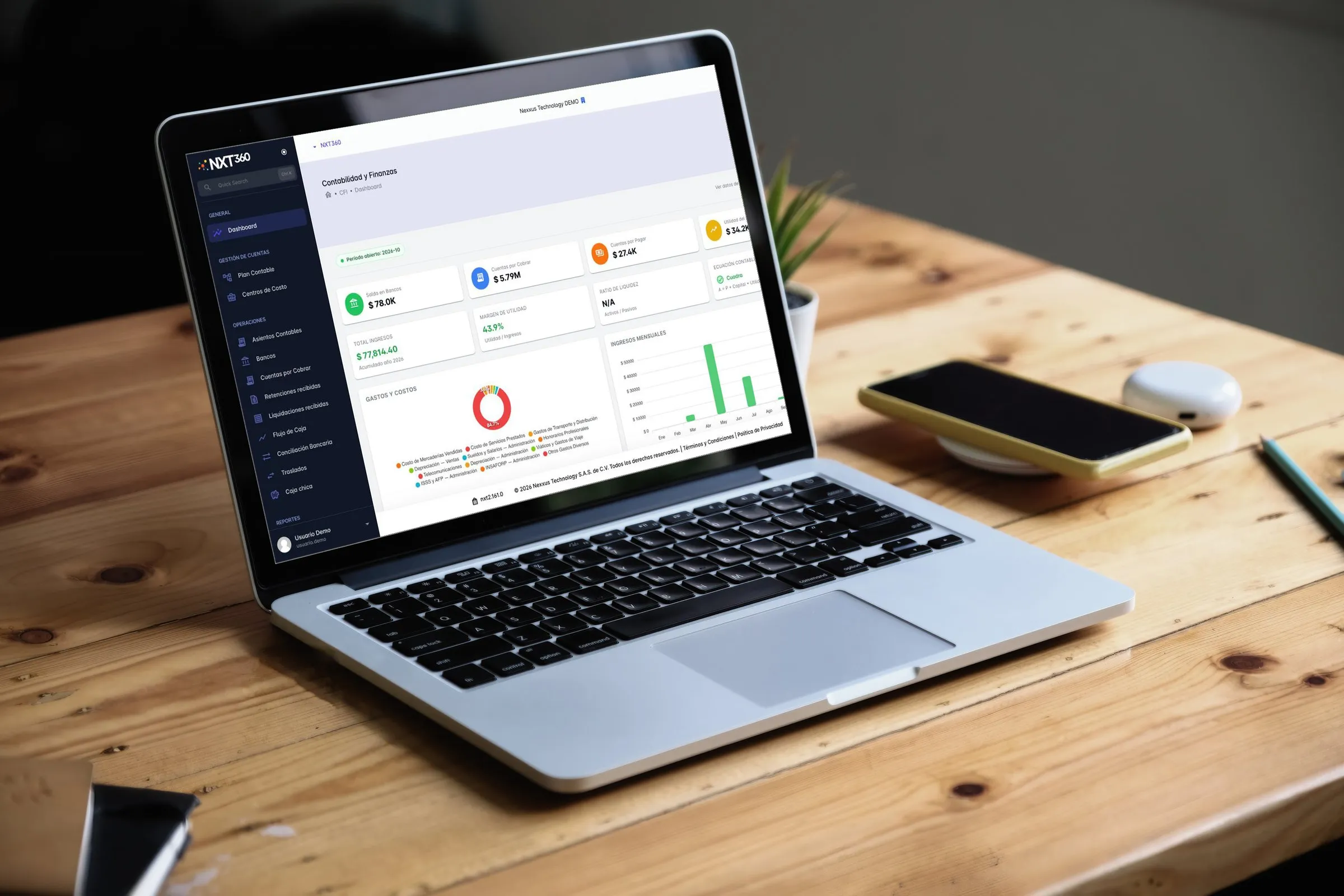
Start with the modules for your operation and, as you grow, enable more on the same platform. Every module comes with its own KPI dashboard.

NXT360 Accounting and Finance dashboard on a laptop: bank, receivables and payables, profit and monthly revenue KPIs, in a demo account

56 modules in9areas. The ones you need todayand the ones you’ll need next.

  • 11

    Finance and accounting

    Books up to date without typing twice.

    • General ledger
    • Accounts receivable
    • Accounts payable
    • Treasury and banks
    • Bank reconciliation
    • Cash flow
    • Fixed assets
    • Budgets
    • Costs and cost centers
    • Supplier withholdings and advances
    • Multi-company and multi-currency
    See details for Finance and accounting
  • 8

    Sales and invoicing

    Quote, invoice and collect from one place.

    • Sales
    • E-invoicing
    • Quotes and proposals
    • Pricing and discounts
    • Kits, bundles and promotions
    • E-commerce
    • Subscriptions and recurring plans
    • Payments and payment links via WhatsApp
    See details for Sales and invoicing
  • 6

    Restaurants and point of sale

    Register, dining room and kitchen on the same order.

    • Point of sale
    • Live table map
    • Kitchen display (KDS)
    • QR digital menu and table ordering
    • Online reservations
    • Tips and cash closings
    See details for Restaurants and point of sale
  • 4

    Customers and marketing

    Serve, follow up and sell more.

    • CRM
    • WhatsApp contact center with AI
    • Email marketing and campaigns
    • Customer portal
    See details for Customers and marketing
  • 7

    Purchasing and suppliers

    Buy better and pay on time.

    • Purchasing
    • Supplier management
    • Requests for quotation
    • Purchase orders
    • Goods receipt
    • Purchase invoice reader
    • Supplier portal
    See details for Purchasing and suppliers
  • 4

    Inventory and operations

    Know what you have, where, and what’s about to expire.

    • Inventory and warehouses
    • Batches and serial numbers
    • Logistics and distribution
    • Manufacturing and production
    See details for Inventory and operations
  • 6

    People and payroll

    Payroll in hours, not days.

    • Payroll
    • Human resources
    • Attendance tracking
    • Vacations
    • Performance reviews
    • Time and shift tracking
    See details for People and payroll
  • 4

    Projects and assets

    Deliver on time and bill every hour worked.

    • Projects
    • Asset maintenance
    • Events and asset rentals
    • Document management
    See details for Projects and assets
  • 6

    Control and intelligence

    Decide with data and let the system do the work.

    • Reports and business intelligence
    • Real-time KPIs and dashboards
    • Approval workflows
    • Automations and business rules
    • AI knowledge and support center
    • Audit trail and traceability
    See details for Control and intelligence

See every feature by module

Built for the way your company works.

Warehouse manager checking shelves with a tablet 02 · Retail and distribution

Retail and distributionfrom quote to collection

Quote, turn it into a sales order, reserve the stock and invoice. The sale moves the warehouse and the receivable with no extra data entry.

  • Quote → sales order → invoice
  • Multiple warehouses, transfers and stock ledger
  • Customers with several branches
  • Email inbox for your suppliers’ documents
I want this for my business
HR analyst working with documents and a laptop 04 · Companies with staff

Companies with stafffrom clock-in to journal entry

Attendance is recorded from the phone, payroll is calculated with your country’s rules and, once processed, the entry reaches accounting.

  • Clock-in and clock-out with photo and location
  • Leave, advances and vacations
  • Biweekly and monthly payroll, year-end bonus and severance
  • Journal entry on processing
I want this for my team

See all use cases

A product for the world, with each country’s rules.

Your company operates under its country’s rules: tax, currency, chart of accounts, tax documents and payroll come from your country profile and are set up during your implementation.

  • Multi-company Enabled Each company in its own database; one user can belong to several.
  • Multi-user Enabled Profiles and permissions per operation for every person.
  • Multi-country Enabled Taxes, tax documents and payroll according to each country profile.
  • Multi-currency With your implementation Issue in one currency and book in another, with exchange rates.
  • Taxes

    Your country’s rates and withholdings.

  • Tax documents

    The ones your tax authority requires.

  • Chart of accounts

    Under IFRS.

  • Payroll

    Labor laws and benefits.

Operate in your country
  • Mexico
  • Guatemala
  • El Salvador
  • Honduras
  • Nicaragua
  • Costa Rica
  • Panama
  • Dominican Republic
  • Colombia
  • Ecuador
  • Peru
  • Chile
  • Argentina
  • United States
  • and more
Request your proposal

Your data, isolated. And everything on record.

Security

  • Isolated company

    Each company’s data lives in its own database.

  • Permissions per operation

    Each profile defines who views, who creates and who approves.

  • Two-step verification

    A code by email at sign-in, if your company turns it on.

Audit

  • Original document

    What comes into the system is kept, for example a supplier’s document.

  • Who, what and when

    Sensitive operations record who did them and when.

  • Clock-ins with evidence

    Every clock-in keeps its photo and location.

One team, from idea to operation.

  1. Implementation

    We set up your company, load your data and adjust NXT360 to your operation: it’s our own code.

  2. Operation

    If you need it, we can also run your payroll and accounting on NXT360.

  3. Support and growth

    Support, audits and Nexxus Academy so your team learns to use it.

Frequently asked questions.

What people ask us most before getting started.

See all questions

Which countries does NXT360 work in?

NXT360 works with a country profile: tax, currency, chart of accounts, tax documents and payroll all come from it. Your country profile is set up during your implementation: tell us where you operate and we’ll prepare your proposal.

Can I start with a single module?

Yes. The modules your company needs are enabled and, as your operation grows, more are enabled on the same platform. Each person’s menu shows only what they have access to.

Is my data separate from other companies’?

Yes. Each company runs isolated, with its own database.

What happens if the connection to the tax authority fails?

Invoicing switches to contingency mode: documents are issued and, once the connection is back, the pending ones are sent.

Can I manage several companies?

Yes. Each company has its own database and one user can belong to several.

Is there a mobile app?

Yes: Waypoint, so your team can log hours and leave and, if your company enables it, clock in and out with photo and location.

Ready to leave Excel behind and grow in order?

Tell us how your company operates and we’ll show you, with your own operation, how much time and how many mistakes NXT360 saves you.

Person smiling on a video call in a bright office